
Trellis Docs vs. Docusaurus

If you're setting up a documentation site in 2026, you're probably looking at Docusaurus. It's Meta-backed, widely adopted, and battle-tested. A lot of teams use it and are happy with it.
I'm one of those people. I use Docusaurus professionally for a large internal developer portal. I also built Trellis Docs — not as an academic exercise, but because I kept hitting friction points on real projects and wanted a framework that started from a writer's perspective instead of an engineer's.
This article isn't arguing you shouldn't use Docusaurus. It's arguing that the right answer depends on what you're optimizing for.
What Docusaurus gets right
Start with what makes Docusaurus genuinely good.
The ecosystem is mature. Around since 2017, two major versions, extensive plugin ecosystem. If you hit a problem, someone has probably hit it before you and written about it.
The community is large. Stack Overflow answers, GitHub discussions, Discord help, and the confidence that the framework will be around long-term. That matters for teams making a long-term bet.
The MDX support is excellent. Clean integration, well-documented component system, and deep customization access through swizzling.
Versioning is first-class. Maintain /v1, /v2, /v3 simultaneously — built into the framework, not bolted on, with years of production use behind it.
Trellis Docs supports the same model, but Docusaurus's versioning has a longer track record.
Algolia integration is seamless. If you qualify for DocSearch and want best-in-class search with minimal configuration, Docusaurus is the fastest path there.
If you're a large team with a complex product, multiple versions, and engineers who can handle React customization, Docusaurus is probably the right choice.
Where Docusaurus creates friction
I've run into most of these friction points firsthand. Some are minor annoyances. A few blocked real work.
Swizzling is powerful and uncomfortable. Customizing theme components means ejecting them from the framework and owning them yourself. Your customized component won't benefit from upstream updates unless you manually reconcile. You're trading maintainability for flexibility.
The configuration surface is large. A production docusaurus.config.js grows with every plugin, locale, custom field, and navbar item. For a small team or a solo writer, the config becomes a liability.
Writer-first defaults aren't a priority. Last-updated dates don't appear unless you set showLastUpdateTime: true — and even then they're buried at the bottom of the page. Heading anchors don't copy on click. Content variables don't exist. You can add all of these, but you're adding them yourself.
presets: [
    [
      'classic',
      /** @type {import('@docusaurus/preset-classic').Options} */
      ({
        docs: {
          sidebarPath: './sidebars.js',
          showLastUpdateTime: true,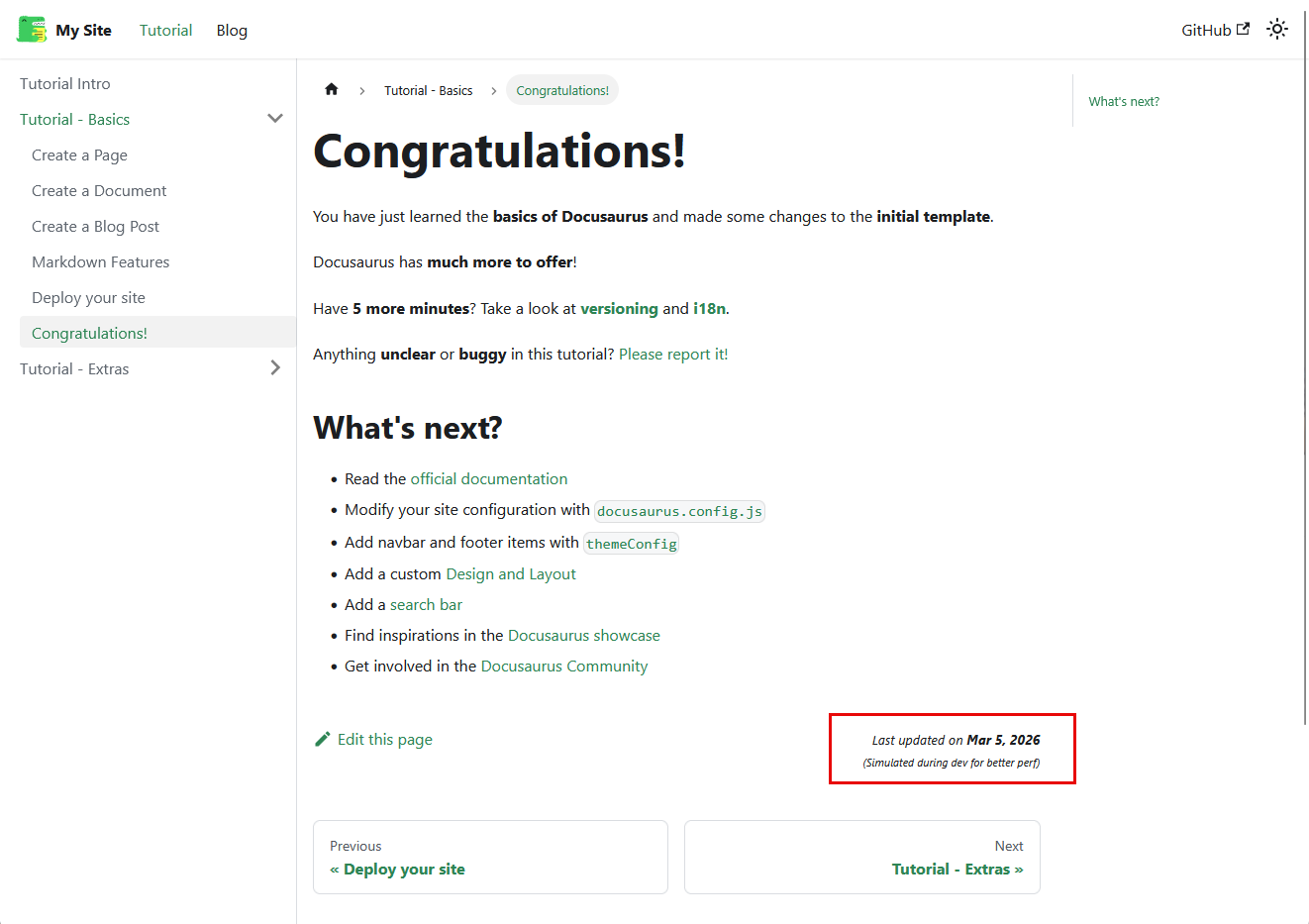
React is required for meaningful customization. Custom components, theme modifications, interactive content — all require React. For documentation teams that include non-engineers, this is a real barrier.
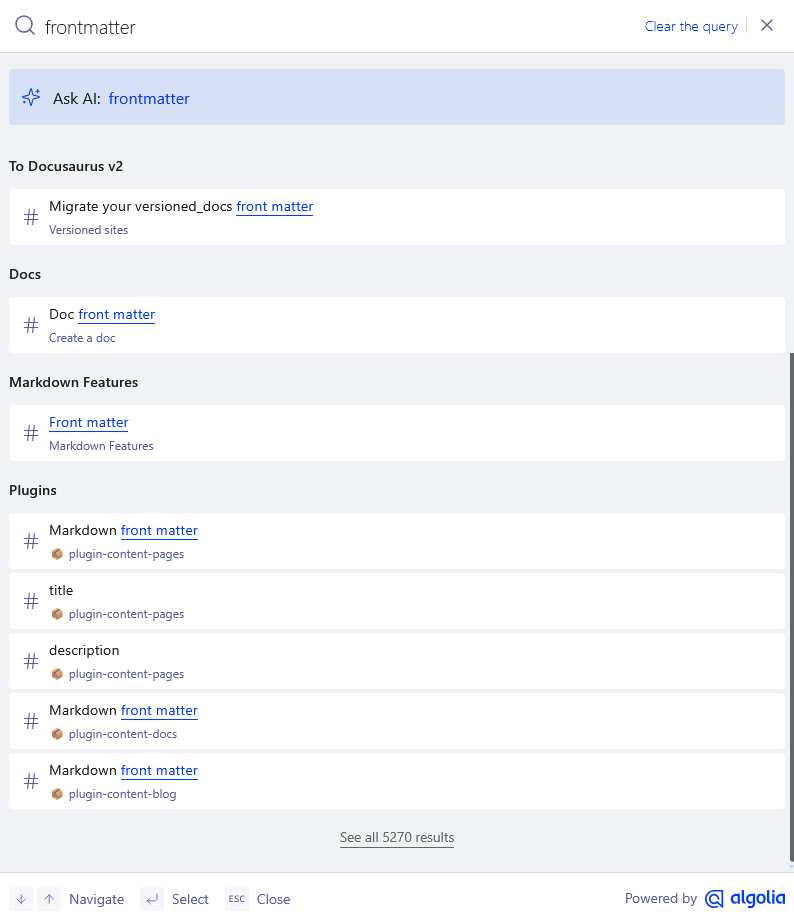
Algolia is best-in-class, but comes with limitations. DocSearch requires an application, an approval process, and a crawler configuration. If you don't qualify, you're building the search index yourself. If your docs live behind a corporate firewall, Algolia doesn't work at all — I hit this directly at Cigna, where the entire developer portal is firewall-restricted.
Even when Algolia works, it over-indexes: it crawls full document text, so search results surface pages that merely mention a term rather than pages that are about it.
Content variables don't exist natively. Product name changes? Find-and-replace across every file. I've done this on large doc sets — it's tedious, error-prone, and leaves you wondering what you missed.
There's no concept of audience in the content model. No built-in way to tag a page for its intended audience — developer, admin, product manager — and surface that to readers. For doc sets that serve multiple personas, this is a recurring gap.
Content auditing requires custom tooling. No built-in way to export a doc inventory without writing your own scripts. I did a full content audit on the developer portal last fall — assembling the inventory manually took more than a week.
What Trellis Docs is optimizing for
Where Docusaurus optimizes for flexibility and ecosystem breadth, Trellis Docs optimizes for the writer's daily experience. More opinions baked in, less configuration required.
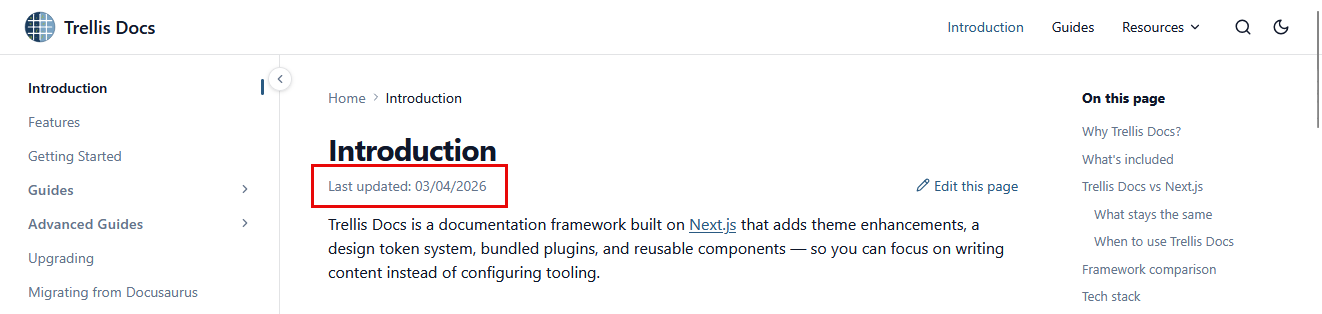
Writer-first defaults, out of the box. Add last_update to frontmatter and the date renders at the top of the page — no global config required. Heading anchors copy on click. These are defaults, not features you turn on.
---
title: Docs
description: Create doc pages, configure frontmatter, manage the sidebar, and organize content.
keywords: [docs, pages, frontmatter, sidebar, images, partials, includes, variables, snippets, vscode]
last_update:
  date: 03/04/2026
  author: Trellis
---
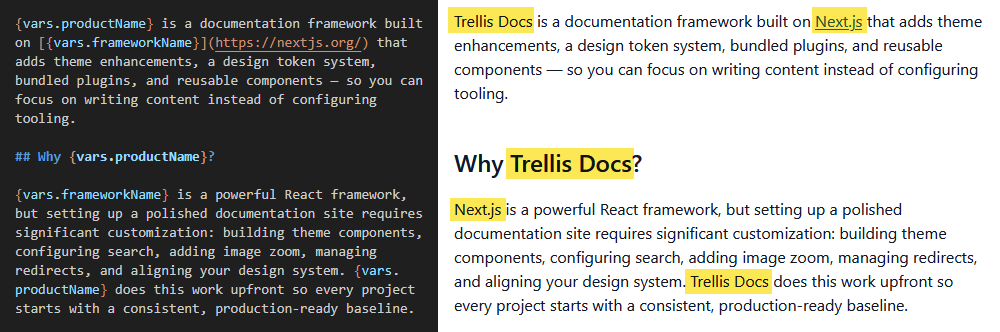
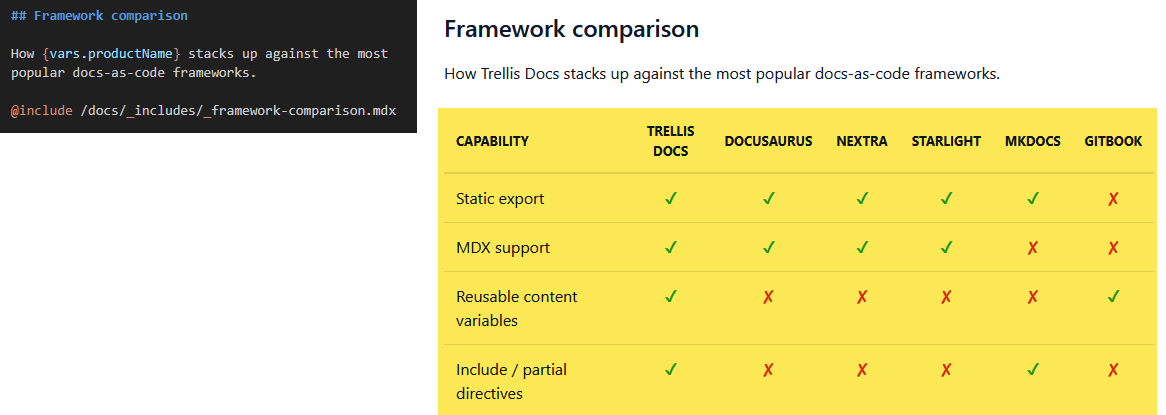
Variables and partials built in. Define a product name once in config/variables.ts and reference it anywhere with {vars.productName}. Pair that with @include directives for shared content partials.
Partials/Includes
Search that's precise, offline, and firewall-safe. Smart Search indexes frontmatter keywords — not raw document text. The index is built at compile time and runs client-side with Fuse.js. No Algolia account, no external API, no outbound calls.
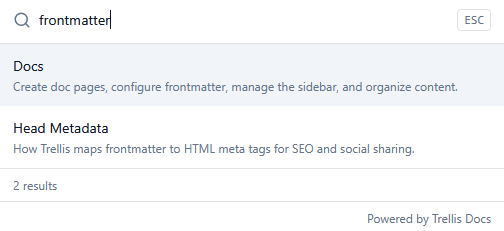
Smart Search only searches the /docs directory, not /blog. Blog posts are meant to be surfaced via the blog index page and RSS feed, not search.
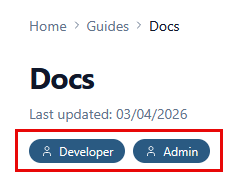
Audience roles built into the content model. The role array in frontmatter renders colored chips below the page title, so readers immediately know whether a page is relevant to them.
---
title: Docs
description: Create doc pages, configure frontmatter, manage the sidebar, and organize content.
keywords: [docs, pages, frontmatter, sidebar, images, partials, includes, variables, snippets, vscode]
last_update:
  date: 03/04/2026
  author: Trellis
role:
  - Developer
  - Admin
---
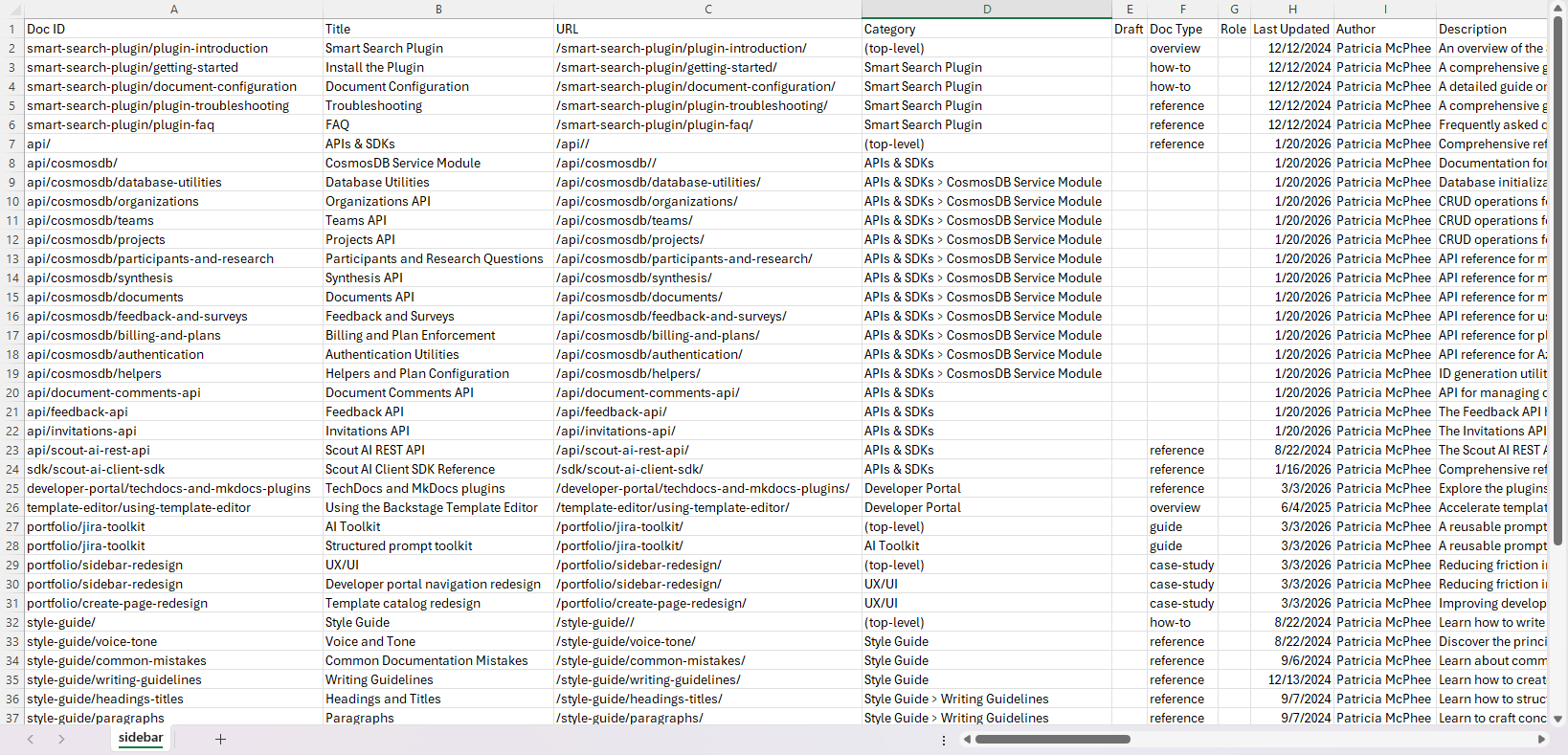
Content auditing in a single command. Run npm run export:sidebar to get a full CSV of your doc inventory — title, URL, doc type, owner, draft status, last updated.
Static HTML export is the default. Deploy to any static host — Vercel, Netlify, GitHub Pages, S3. No runtime server, no vendor lock-in.
API documentation lives alongside your guides. Drop an OpenAPI spec in content/api/ and get a full reference page via ReDoc, themed to match your design tokens. No separate tool or site.
Getting started takes minutes, not hours. npx create-trellis-docs my-docs handles setup with interactive prompts and platform detection. Migrating from Docusaurus? There's an automated migration script that copies content, converts sidebar config, and suggests variable extraction.
A direct comparison
| Trellis Docs | Docusaurus | |
|---|---|---|
| Built on | Next.js 15 | React (custom framework) |
| Setup time to production-ready | Under an hour | 20–40+ hours |
| Versioning | Full (snapshot-based, version switcher, per-version sidebar and search) | Full (built-in, battle-tested) |
| Search | Metadata keyword-based (Smart Search); offline, no external API, firewall-safe | Algolia (best-in-class quality, requires external service) or plugin |
| Variables in content | Built-in | Not available natively |
| Include directives | @include syntax | MDX import syntax |
| Audience role chips | Built-in; frontmatter role array renders colored chips below the title | Not available |
| Content audit export | Built-in CSV export (npm run export:sidebar) | Not available |
| OpenAPI rendering | Built-in (ReDoc) | Plugin required |
| Last-updated date | Frontmatter last_update; renders at top of page | Requires showLastUpdateTime: true; renders at bottom |
| Customization model | React components | Swizzling + React |
| Plugin ecosystem | Next.js ecosystem | Docusaurus-specific |
| Community size | Small, early | Large, established |
| Vendor lock-in | None (static export) | None (static export) |
| Best for | Writers who want a fast, opinionated start | Teams that need a mature ecosystem or versioning with years of production history |
The honest tradeoffs
Trellis Docs makes tradeoffs worth being clear about.
The community is small. No Stack Overflow threads, no community plugins, no years of production history. If you hit an edge case, you're likely the first.
The versioning ecosystem is younger. The capability matches Docusaurus — snapshot-based freezing, version-prefixed URLs, per-version sidebar and search. What Docusaurus has is years of production use and community-reported edge cases. For high-stakes, multi-version doc sets, Docusaurus is the safer bet on maturity alone.
The plugin ecosystem is Next.js, not documentation-specific. Large and actively maintained, but documentation-specific plugins from the Docusaurus ecosystem don't have Trellis equivalents.
If any of those are dealbreakers, Docusaurus is probably the right choice.
How to choose
Choose Docusaurus if:
- You want the most battle-tested versioning implementation — both frameworks support it fully, but Docusaurus has years of production history behind it
- You want a large community and a mature plugin ecosystem
- You have engineers on the team who can handle React customization and swizzling
- You're building something complex enough that the configuration investment makes sense
Choose Trellis Docs if:
- You want to be writing content, not configuring tooling
- You're a small team, a solo writer, or a startup that needs a production-ready docs site fast
- Content variables, include directives, built-in content auditing, and writer-first defaults matter more than ecosystem breadth
- You're documenting an API and want reference and guides in one site without a separate tool
- You're comfortable being an early adopter in exchange for a faster, more opinionated setup
Both frameworks produce good documentation sites. The difference is what you're spending your time on to get there.
Trellis Docs is available on npm and documented at trellisdocs.dev. If you're coming from Docusaurus and want to see what the migration looks like, the migration guide is here.